

---
title: "Horizontal Default Style"
url: https://cooltimeline.com/elementor-widget/horizontal-timeline-default/
date: 2025-11-04
modified: 2026-07-02
lang: en
author: "cpsatinder"
description: "Horizontal Timeline (Default Style) Elementor Horizontal Timeline - Default Style Explore the Default Style Elementor Horizontal Timeline and create timeline layouts with a clean and responsive design. Simple Multi Color..."
image: https://cooltimeline.com/wp-content/uploads/2025/12/horizontal_timeline_Default_stlye.jpg
word_count: 944
---

# Horizontal Default Style

**Horizontal Timeline (Default Style)**

# Elementor Horizontal Timeline - Default Style
Explore the Default Style [Elementor Horizontal Timeline](https://cooltimeline.com/doc/horizontal-timeline-story/) and create timeline layouts with a clean and responsive design.

Simple

Multi Color

Dark BG

Dark Timeline

![](https://cooltimeline.com/wp-content/uploads/2025/10/icon-timeline-widget-elementor-150x150.png)
### Timeline Widget Pro
[
Deafult
](/elementor-widget/horizontal-timeline-default/)
[
Classic
](/elementor-widget/horizontal-timeline-classic/)
[
Elegant
](/elementor-widget/horizontal-timeline-elegant/)
[
Clean
](/elementor-widget/horizontal-timeline-clean/)
[
Minimal
](/elementor-widget/horizontal-timeline-minimal/)
[
Flat
](/elementor-widget/horizontal-timeline-flat/)
[

Buy plugin
](/plugin/elementor-timeline-widget-pro/#pricing)

## Elementor Horizontal Timeline - Default Style
Horizontal default style timeline with simple colors.

Step 1 Cleanse Skin![face-cleanser](https://cooltimeline.com/wp-content/uploads/2026/01/face-cleanser.jpg)Start with a gentle cleanser to remove dirt, oil, sweat, and makeup from your skin. Cleansing helps keep pores clean and prepares your skin for the next steps. Use a mild cleanser that suits your skin type and avoid harsh rubbing.
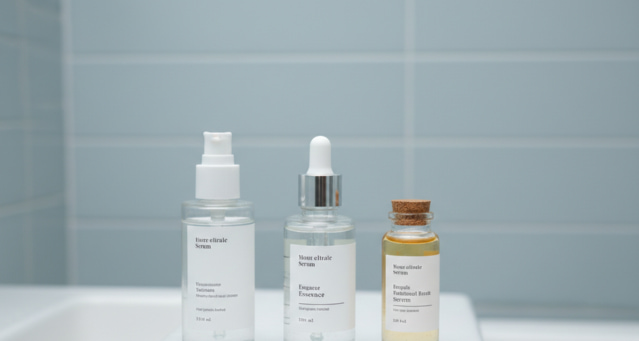
Step 2Apply Serum![Serum](https://cooltimeline.com/wp-content/uploads/2026/01/Serum.jpg)Serums deliver targeted ingredients to address specific concerns like dullness, dryness, acne, or fine lines. Use only a few drops and gently spread it across your face. This step helps improve skin health over time.

Step 3Lock with Moisturizer![Moisturizer](https://cooltimeline.com/wp-content/uploads/2026/01/Moisturizer.jpg)Moisturizer locks in hydration and keeps the skin soft and balanced. It strengthens the skin barrier and prevents moisture loss. Choose a lightweight or rich formula based on your skin type and apply evenly.
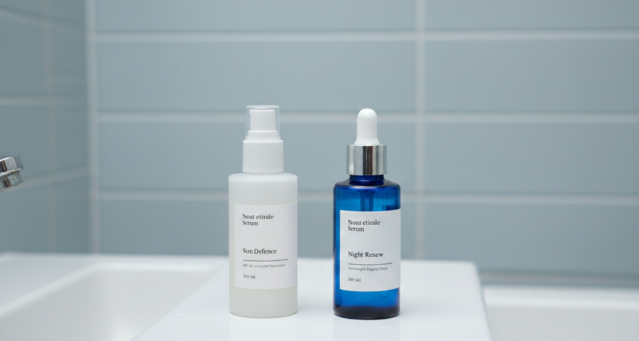
Step 4Sun Protection & Night Care![Sun Protection & Night Care](https://cooltimeline.com/wp-content/uploads/2026/01/Sun-Protection-Night-Care.jpg)During the day, apply sunscreen as the final step to protect your skin from harmful UV rays and prevent aging and dark spots. At night, skip sunscreen and focus on repair using a nourishing night cream or sleeping mask to support skin recovery while you sleep.

#### Default Style - Multi Color
Horizontal default style timeline with multi colors.

2000 - 2003Taxi DriverTaxi Driver At Uber Professional Taxi![](https://cooltimeline.com/wp-content/uploads/2025/11/Uber.jpg)- Driving from point A to point B and if necessary to point C and sometimes even to point R and point S.- I was known as experienced driver. 2003 - 2004 InternIntern At Quick Fox Technologies![](https://cooltimeline.com/wp-content/uploads/2025/11/fx34w32fvufc2g2z-e1606996118397.jpg)![](https://cooltimeline.com/wp-content/uploads/2025/11/picture-2-1024x683-1-e1606996036240.jpg)![](https://cooltimeline.com/wp-content/uploads/2025/11/the_toolkit_of_a_freelance_developer-1500x1001-2-1024x683.jpg)

- This was beginning of my career. Developed, managed, operated and promoted an Internet business.- Handled customer support issues.2004 - 2008Webmaster / Support DeveloperWebmaster Support For Grift Tech![](https://cooltimeline.com/wp-content/uploads/2025/11/AdobeStock.jpeg)- Developed, managed, operated and promoted an Internet business.- Handled customer support issues.- Planned and managed business finances.2008 - 2011System Analyst / DeveloperDeveloper At Elements Pvt. Ltd.![](https://cooltimeline.com/wp-content/uploads/2025/11/image-optimization-768x512.jpg)Rebuilt and enhanced existing ASP B2C site with ASP.NET 2.0 Framework and tools. Technology consists of ASP.NET 2.0 (C#), IIS, Microsoft SQL Server 2005, **Stored Procedures & PayPal Instant Payment Notification**.

Timeline on Dark BG

#### Horizontal Default Style Timeline

Idea Validation StartedInitial research began to understand user needs, compare competitors, and check market demand.

Core Team FormedDevelopers and designers joined the project, and the first branding elements & website structure were created.

Prototype CompletedA working prototype was built for internal testing, and early user feedback helped refine core features.

Alpha Version ReleasedThe first functional version was released internally, allowing the team to identify bugs and improve performance.

#### Default Style - Dark Timeline
Horizontal default style dark timeline for light backgrounds.

Step 1
StrategyInitial Talks & ResearchInitial Talks And Market Research![](https://cooltimeline.com/wp-content/uploads/2025/11/you-x-ventures-X8H8vPcelPk-unsplash-1024x683-1-1.jpg)From the starting in our work process, we gather the requirements and talk to the clients to know that what their goals are.

Step 2
PlanningDesign & ContentDesign Review & Content Writing![](https://cooltimeline.com/wp-content/uploads/2025/11/picture-2-1024x683-1-e1606996036240.jpg)**Design**: In this phase, our designers create PSD layouts of web pages.

Step 3
BuildDevelopment & SetupWeb Development![](https://cooltimeline.com/wp-content/uploads/2025/11/the_toolkit_of_a_freelance_developer-1500x1001-2.jpg)**Web Development**: Now, it’s time for front end development to start and produce.

Step 4
PromoteMarketing & MaintenanceWebsite Optimization & Maintenance![](https://cooltimeline.com/wp-content/uploads/2025/11/AdobeStock.jpeg)**Website Optimization**: We optimize website to improves ranking, page speed and ROI.

### FAQ's

What is an Elementor Horizontal Timeline?

An **Elementor Horizontal Timeline** is a timeline layout that displays events, milestones, or historical information from left to right. It helps visitors understand chronological content in an attractive and interactive format without requiring custom code.

How do I create a horizontal timeline in Elementor?

You can create a horizontal timeline by installing the [**Timeline Widget for Elementor**](https://cooltimeline.com/demo/elementor-timeline-widget/) plugin, adding the timeline widget to your page, selecting the Horizontal Layout, and customizing the content, colors, typography, images, and navigation using Elementor’s visual editor.

Is the Elementor Horizontal Timeline responsive?

Yes. The Elementor Horizontal Timeline automatically adapts to desktops, tablets, and mobile devices, ensuring your timeline remains easy to navigate on every screen size. Explore other [WordPress Timeline Plugins](https://coolplugins.net/products-list/timeline-plugins/).

Can I add images and icons to my Horizontal Timeline in Elementor?

Yes. You can include images, icons, dates, titles, descriptions, and links for every timeline item to create visually engaging timelines that match your website’s branding.

What can I use an Elementor Horizontal Timeline for?

It is ideal for displaying company history, project milestones, product launches, event schedules, educational roadmaps, business achievements, portfolios, and historical timelines in a visually organized format.

Can I create a Vertical Timeline with the Timeline Widget for Elementor?

Yes, the Timeline Widget for Elementor supports both Horizontal Timeline and [**Elementor Vertical Timeline**](https://cooltimeline.com/elementor-widget/vertical-timeline-default/) layouts, allowing you to display milestones, events, and chronological content in either style.

An **Elementor Horizontal Timeline** is a timeline layout that displays events, milestones, or historical information from left to right. It helps visitors understand chronological content in an attractive and interactive format without requiring custom code.

You can create a horizontal timeline by installing the [**Timeline Widget for Elementor**](https://cooltimeline.com/demo/elementor-timeline-widget/) plugin, adding the timeline widget to your page, selecting the Horizontal Layout, and customizing the content, colors, typography, images, and navigation using Elementor's visual editor.

Yes. The Elementor Horizontal Timeline automatically adapts to desktops, tablets, and mobile devices, ensuring your timeline remains easy to navigate on every screen size. Explore other [WordPress Timeline Plugins](https://coolplugins.net/products-list/timeline-plugins/).

Yes. You can include images, icons, dates, titles, descriptions, and links for every timeline item to create visually engaging timelines that match your website's branding.

It is ideal for displaying company history, project milestones, product launches, event schedules, educational roadmaps, business achievements, portfolios, and historical timelines in a visually organized format.

Yes, the Timeline Widget for Elementor supports both Horizontal Timeline and [**Elementor Vertical Timeline**](https://cooltimeline.com/elementor-widget/vertical-timeline-default/) layouts, allowing you to display milestones, events, and chronological content in either style.