
---
title: "Timeline Module for Divi"
url: https://cooltimeline.com/plugin/timeline-module-for-divi/
date: 2025-11-03
modified: 2026-09-01
lang: en
author: "cpsatinder"
description: "Timeline Module for Divi Create Horizontal and Vertical Timelines in Divi Easily design beautiful horizontal and vertical timelines in Divi Builder to showcase stories, events, or milestones. 2,000+ Active Installs..."
image: https://cooltimeline.com/wp-content/uploads/2025/11/plugin-timeline-module-divi.jpg
word_count: 1460
---

# Timeline Module for Divi

Timeline Module for Divi

# Create Horizontal and Vertical Timelines in Divi
Easily design beautiful horizontal and vertical timelines in Divi Builder to showcase stories, events, or milestones.

### 2,000+

Active Installs

### 10+

Reviews on WP.org

Buy Plugin

[
View Demos
](http://cooltimeline.com/divi/)
https://youtu.be/3K-uJM-M14E
![user-img](https://cooltimeline.com/wp-content/uploads/2025/10/user-img-red-bg.png) **174+** reviews on  ![Trustpilot](https://eventscalendaraddons.com/wp-content/uploads/2025/09/trustpilot-main-logo-80.png)

![divi-timeline](https://cooltimeline.com/wp-content/uploads/2025/10/icon-divi-timeline-150x150.png)
### Timeline Module for Divi

Features

[
Demos
](http://cooltimeline.com/divi/)

Reviews

[
Docs
](/docs/timeline-module-pro-for-divi/)
[
Changelog
](/doc/changelog-timeline-module-for-divi/)

View Pricing

[

Bundle Discount
](/pricing/)

### Plugin Features

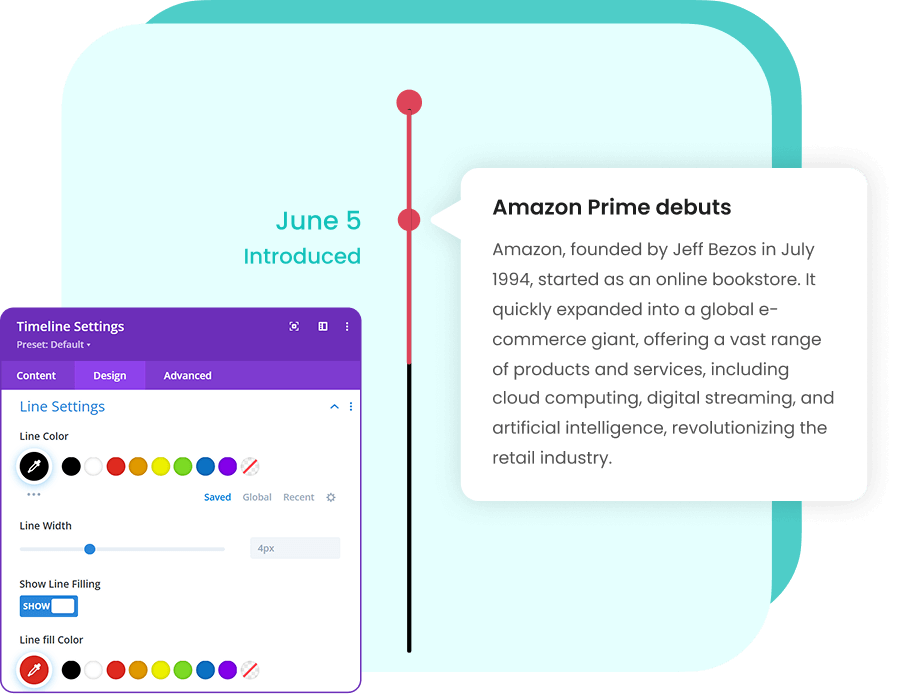
Vertical Timeline Layouts![](https://cooltimeline.com/wp-content/uploads/2025/11/vertical-divi.png)Create stunning vertical timelines to display your stories, events, or milestones in a clean, chronological order. Choose from multiple styles to match your Divi design.

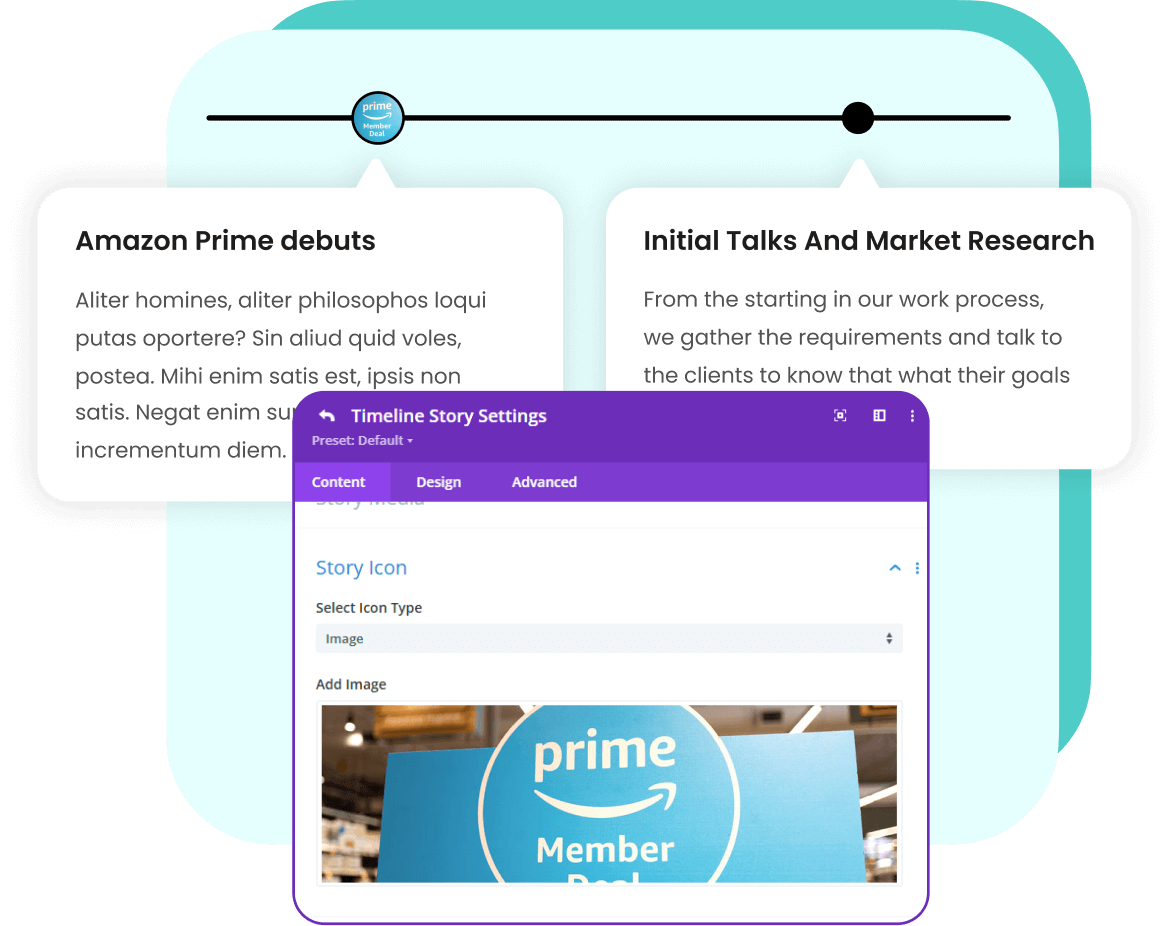
Horizontal Timeline Layouts![](https://cooltimeline.com/wp-content/uploads/2025/11/horizontal-divi.png)Design beautiful horizontal timelines to showcase your journey, achievements, or project milestones in a visually engaging way. Choose from different layouts that match your website’s design.
![divi-timeline](https://cooltimeline.com/wp-content/uploads/2025/10/icon-divi-timeline.png) Timeline Module for Divi

### Pricing Plans

### Annual License

For 1 Website • 1 Year Plugin Updates

25% OFF
$25

$19
/ year

License

1 Website

5 Websites

25 Websites

500 Websites

[
Buy Plugin — $19 ](https://my.coolplugins.net/checkout/?add-to-cart=39252&apply-coupon=offer-tmy)

⚡
Extra discount available —
Apply Discount

- Use on 1 website
- 1 year of plugin updates
- 1 year of premium support

Best Value

### Lifetime License

For 1 Website • Lifetime Plugin Updates

10% OFF
$65

$59
/ one-time

License

1 Website

5 Websites

25 Websites

500 Websites

[
Buy Plugin — $59 ](https://my.coolplugins.net/checkout/?add-to-cart=39256&apply-coupon=tml-off10)

⚡
Extra discount available —
Apply Discount

- Use on 1 website
- Lifetime plugin updates
- Lifetime premium support

SAVE
$$$

### Get All Timeline Plugins Bundle & Save More

4 plugins bundle at a discounted price

-
![](https://my.coolplugins.net/wp-content/uploads/2025/09/icon-divi-timeline.png)
Timeline Module for Divi (PRO)

-
![](https://my.coolplugins.net/wp-content/uploads/2024/07/icon-timeline-block.png)
Timeline Block for Gutenberg (Pro)

-
![](https://my.coolplugins.net/wp-content/uploads/2024/07/icon-timeline-widget-elementor.png)
Timeline Widget for Elementor (Pro)

-
![](https://my.coolplugins.net/wp-content/uploads/2024/07/icon-cool-timeline.png)
Cool Timeline Pro

Starting at

$128
UP TO 84% OFF

$59
/ year

[
View Bundle Pricing ](https://cooltimeline.com/pricing/)

14-Day Money Back Guarantee

Your purchase is protected with our 14-day money-back guarantee.

Secure SSL encrypted payment by
PayPal & Stripe (Credit & Debit Cards)

![](https://cooltimeline.com/wp-content/uploads/2025/10/secure-payment-coolplugins.png)
### Loved by Timeline Plugin Users
Read genuine feedback from users who enhanced their websites with our Timeline Plugins.

![review-quote](/wp-content/uploads/2025/10/double_quote.svg)
![review-stars](/wp-content/uploads/2025/10/five-star.svg)
the plugins are excellent and their customer support is also quick and friendly
![Heeren Tanna](https://cooltimeline.com/wp-content/uploads/2025/11/Heeren-Tanna.png)
@heeren_tanna
![review-quote](/wp-content/uploads/2025/10/double_quote.svg)
![review-stars](/wp-content/uploads/2025/10/five-star.svg)
Their plugin is excellent, but their support is even better. Truly incredible!
![Chanutphon](https://cooltimeline.com/wp-content/uploads/2025/11/Chanutphon.png)
@chanutphon
![review-quote](/wp-content/uploads/2025/10/double_quote.svg)
![review-stars](/wp-content/uploads/2025/10/five-star.svg)
I had an amazing and blazing fast support expierience. In not even 15 minutes my problem was solved.
![Harry E.](https://cooltimeline.com/wp-content/uploads/2025/11/Harry-E.png)
@harry_e
![review-quote](/wp-content/uploads/2025/10/double_quote.svg)
![review-stars](/wp-content/uploads/2025/10/five-star.svg)
Top Support and an overall solid plugin. I will recommend their products to other developers..
![George](https://cooltimeline.com/wp-content/uploads/2025/11/George.png)
@george
![review-quote](/wp-content/uploads/2025/10/double_quote.svg)
![review-stars](/wp-content/uploads/2025/10/five-star.svg)
The development team showed a high level technical competence, responding quickly and effectively to all questions raised.
![Manuel Gamelas](https://cooltimeline.com/wp-content/uploads/2025/11/Manuel-Gamelas.png)
@manuel_gamelas
![review-quote](/wp-content/uploads/2025/10/double_quote.svg)
![review-stars](/wp-content/uploads/2025/10/five-star.svg)
excellent plugin very easy to use and extremely fast response to my support email
![Neil White](https://cooltimeline.com/wp-content/uploads/2025/11/Neil-White.png)
@neil_white
![review-quote](/wp-content/uploads/2025/10/double_quote.svg)
![review-stars](/wp-content/uploads/2025/10/five-star.svg)
Works great out of the box. Also, very customizable with a bit of CSS. Can’t beat this for FREE!

![](https://cooltimeline.com/wp-content/uploads/2025/11/jacquid.png)
@jacquid

![review-quote](/wp-content/uploads/2025/10/double_quote.svg)
![review-stars](/wp-content/uploads/2025/10/five-star.svg)
the plugins are excellent and their customer support is also quick and friendly
![Heeren Tanna](https://cooltimeline.com/wp-content/uploads/2025/11/Heeren-Tanna.png)
@heeren_tanna
![review-quote](/wp-content/uploads/2025/10/double_quote.svg)
![review-stars](/wp-content/uploads/2025/10/five-star.svg)
Their plugin is excellent, but their support is even better. Truly incredible!
![Chanutphon](https://cooltimeline.com/wp-content/uploads/2025/11/Chanutphon.png)
@chanutphon
![review-quote](/wp-content/uploads/2025/10/double_quote.svg)
![review-stars](/wp-content/uploads/2025/10/five-star.svg)
I had an amazing and blazing fast support expierience. In not even 15 minutes my problem was solved.
![Harry E.](https://cooltimeline.com/wp-content/uploads/2025/11/Harry-E.png)
@harry_e
![review-quote](/wp-content/uploads/2025/10/double_quote.svg)
![review-stars](/wp-content/uploads/2025/10/five-star.svg)
Top Support and an overall solid plugin. I will recommend their products to other developers..
![George](https://cooltimeline.com/wp-content/uploads/2025/11/George.png)
@george
![review-quote](/wp-content/uploads/2025/10/double_quote.svg)
![review-stars](/wp-content/uploads/2025/10/five-star.svg)
The development team showed a high level technical competence, responding quickly and effectively to all questions raised.
![Manuel Gamelas](https://cooltimeline.com/wp-content/uploads/2025/11/Manuel-Gamelas.png)
@manuel_gamelas
![review-quote](/wp-content/uploads/2025/10/double_quote.svg)
![review-stars](/wp-content/uploads/2025/10/five-star.svg)
excellent plugin very easy to use and extremely fast response to my support email
![Neil White](https://cooltimeline.com/wp-content/uploads/2025/11/Neil-White.png)
@neil_white
![review-quote](/wp-content/uploads/2025/10/double_quote.svg)
![review-stars](/wp-content/uploads/2025/10/five-star.svg)
Works great out of the box. Also, very customizable with a bit of CSS. Can’t beat this for FREE!
![](https://cooltimeline.com/wp-content/uploads/2025/11/jacquid.png)
@jacquid
![user-img](https://cooltimeline.com/wp-content/uploads/2025/10/user-img-red-bg.png) **174+** reviews on ![](https://cooltimeline.com/wp-content/uploads/2025/10/trustpilot-main-logo-80-300x74.png)

#### Frequently Asked Questions...

###### I need help with a plugin...
what should I do?
![](https://cooltimeline.com/wp-content/uploads/2025/10/cool-team.png)
###### We’re Known for Our Support!
Stuck somewhere? Reach out to our helpful team for fast and friendly assistance.

[

Contact Support
](/support/)

What is Timeline Module for Divi?

**Timeline Module for Divi** is a Divi Builder plugin that lets you create vertical and horizontal timelines to showcase stories, events, or milestones with images, icons, and custom layouts.

How can I create vertical and horizontal timelines in Divi?

You can create vertical and horizontal timelines in Divi using **Timeline Module for Divi**. Simply add the module to your page, choose the layout (vertical or horizontal), and customize your stories with images, icons, labels, and styles to match your design.

What happens if I move my website from staging to live?

You can deactivate the license from your staging site and activate it on your live site. If needed, you can also reset or [manage activations](https://cooltimeline.com/docs/timeline-module-pro-for-divi/) from your account dashboard.

I bought the wrong plugin. Can I get a refund?

Yes. If you purchased the wrong version (for example, Elementor instead of Divi), you can request a refund within the refund period.

What is your refund policy for plugin purchases?

We offer a **14-day risk-free money-back guarantee** on all premium plugin purchases. If you’re not satisfied, just contact us and we’ll process your refund.
![🔗](https://s.w.org/images/core/emoji/16.0.1/svg/1f517.svg) [Read our refund policy here](https://my.coolplugins.net/terms/refund-policy/)

How can I create vertical and horizontal timelines in Divi?

You can create vertical and horizontal timelines in Divi using **Timeline Module for Divi**. Simply add the module to your page, choose the layout (vertical or horizontal), and customize your stories with images, icons, labels, and styles to match your design.

How do I switch between vertical and horizontal timeline layouts in Divi?

Open the **Timeline Module settings** in the Divi Builder. Under the Design tab, select either **Vertical or Horizontal layout**. The timeline layout updates instantly when you make your selection.

Can I use Timeline Module for Divi outside Divi Builder?

No. Timeline Module for Divi is designed specifically for the Divi Builder and can only be used on Divi pages.
If you want to use a timeline plugin with other page builders:

- Elementor: Use [**Timeline Widget Pro**](https://cooltimeline.com/plugin/elementor-timeline-widget-pro/) for drag-and-drop timeline creation.
- WordPress Classic or shortcode-based timelines: Use [**Cool Timeline Pro**](https://cooltimeline.com/plugin/cool-timeline-pro/).
- Gutenberg: Use [**Timeline Block Pro**](https://cooltimeline.com/plugin/timeline-block-pro-for-gutenberg/) to add vertical and horizontal timelines directly in Gutenberg pages.

This way, you can choose the right timeline solution depending on your page builder.

Can I change the colors and fonts of my timeline in Divi?

Yes! In the Timeline Module settings, go to the **Design tab** to customize colors, fonts, typography, and spacing, ensuring your timeline matches your website’s design perfectly.

Can I add icons or images to timeline items in Divi?

Yes. In the Content tab of the Timeline Module, you can upload an icon or image for each timeline entry to make your timeline more engaging and visually appealing.

Can I show multiple timelines on one page in Divi?

Yes! You can **add multiple Timeline** Modules to the same page. Each timeline can have its own unique design and content, making it easy to display different timelines together.

How can I reorder timeline items in Divi?

You can **drag and drop timeline** items directly within the Divi Builder, allowing you to easily rearrange events or milestones in any order without rebuilding your timeline.

Can I view the documentation and live demos for Timeline Module for Divi?

Yes. You can explore the complete [**Timeline Module for Divi documentation**](https://cooltimeline.com/docs/timeline-module-pro-for-divi/) to learn how to create and customize timelines step-by-step. You can also check out the [live demos](https://cooltimeline.com/divi/) to see all vertical, horizontal, and advanced timeline layouts in action.

**Timeline Module for Divi** is a Divi Builder plugin that lets you create vertical and horizontal timelines to showcase stories, events, or milestones with images, icons, and custom layouts.

You can create vertical and horizontal timelines in Divi using **Timeline Module for Divi**. Simply add the module to your page, choose the layout (vertical or horizontal), and customize your stories with images, icons, labels, and styles to match your design.

You can deactivate the license from your staging site and activate it on your live site. If needed, you can also reset or [manage activations](https://cooltimeline.com/docs/timeline-module-pro-for-divi/) from your account dashboard.

Yes. If you purchased the wrong version (for example, Elementor instead of Divi), you can request a refund within the refund period.

We offer a **14-day risk-free money-back guarantee** on all premium plugin purchases. If you’re not satisfied, just contact us and we’ll process your refund.
![🔗](https://s.w.org/images/core/emoji/16.0.1/svg/1f517.svg) [Read our refund policy here](https://my.coolplugins.net/terms/refund-policy/)You can create vertical and horizontal timelines in Divi using **Timeline Module for Divi**. Simply add the module to your page, choose the layout (vertical or horizontal), and customize your stories with images, icons, labels, and styles to match your design.

Open the **Timeline Module settings** in the Divi Builder. Under the Design tab, select either **Vertical or Horizontal layout**. The timeline layout updates instantly when you make your selection.

No. Timeline Module for Divi is designed specifically for the Divi Builder and can only be used on Divi pages.
If you want to use a timeline plugin with other page builders:

- Elementor: Use [**Timeline Widget Pro**](https://cooltimeline.com/plugin/elementor-timeline-widget-pro/) for drag-and-drop timeline creation.
- WordPress Classic or shortcode-based timelines: Use [**Cool Timeline Pro**](https://cooltimeline.com/plugin/cool-timeline-pro/).
- Gutenberg: Use [**Timeline Block Pro**](https://cooltimeline.com/plugin/timeline-block-pro-for-gutenberg/) to add vertical and horizontal timelines directly in Gutenberg pages.

This way, you can choose the right timeline solution depending on your page builder.Yes! In the Timeline Module settings, go to the **Design tab** to customize colors, fonts, typography, and spacing, ensuring your timeline matches your website’s design perfectly.

Yes. In the Content tab of the Timeline Module, you can upload an icon or image for each timeline entry to make your timeline more engaging and visually appealing.

Yes! You can **add multiple Timeline** Modules to the same page. Each timeline can have its own unique design and content, making it easy to display different timelines together.

You can **drag and drop timeline** items directly within the Divi Builder, allowing you to easily rearrange events or milestones in any order without rebuilding your timeline.

Yes. You can explore the complete [**Timeline Module for Divi documentation**](https://cooltimeline.com/docs/timeline-module-pro-for-divi/) to learn how to create and customize timelines step-by-step. You can also check out the [live demos](https://cooltimeline.com/divi/) to see all vertical, horizontal, and advanced timeline layouts in action.