
Custom Order Timeline Queries - Cool Timeline Pro

Q1: How to create a timeline of existing posts?
Ans:
To create a timeline of your existing posts with Cool Timeline Pro:

  • In the WordPress dashboard, go to Pages > Add New (or edit an existing page).
  • Insert the “Timeline Shortcode” block.
  • From the shortcode options, switch to the “Post Timeline” source so that the timeline displays your published posts.
  • If you want to display posts from a particular post type or category, specify the post-type and category filters accordingly.

Once done, publish or update the page, your existing posts will now appear in timeline format automatically.

Q2: How to create a timeline of stories before the year 1000?
Ans:
To create a timeline of stories before the year 1000, you can use the Custom Order-Based story option. While adding a new story, choose the custom order-based setting and enter any date earlier than 1000 inside the custom label field.

Q3: What is the Custom Date format?
Ans:
A Custom Date Format allows you to display story dates in your own preferred style instead of using the default date formats provided by Cool Timeline Pro.
Instead of selecting a date style from the dropdown menu, you can manually enter your own date format. To set this up, go to Story Timeline Shortcode > Advanced. From here, set the Stories Date option to Show, and then from Date Format select Custom, and then enter your preferred format in the Custom Date Format field.
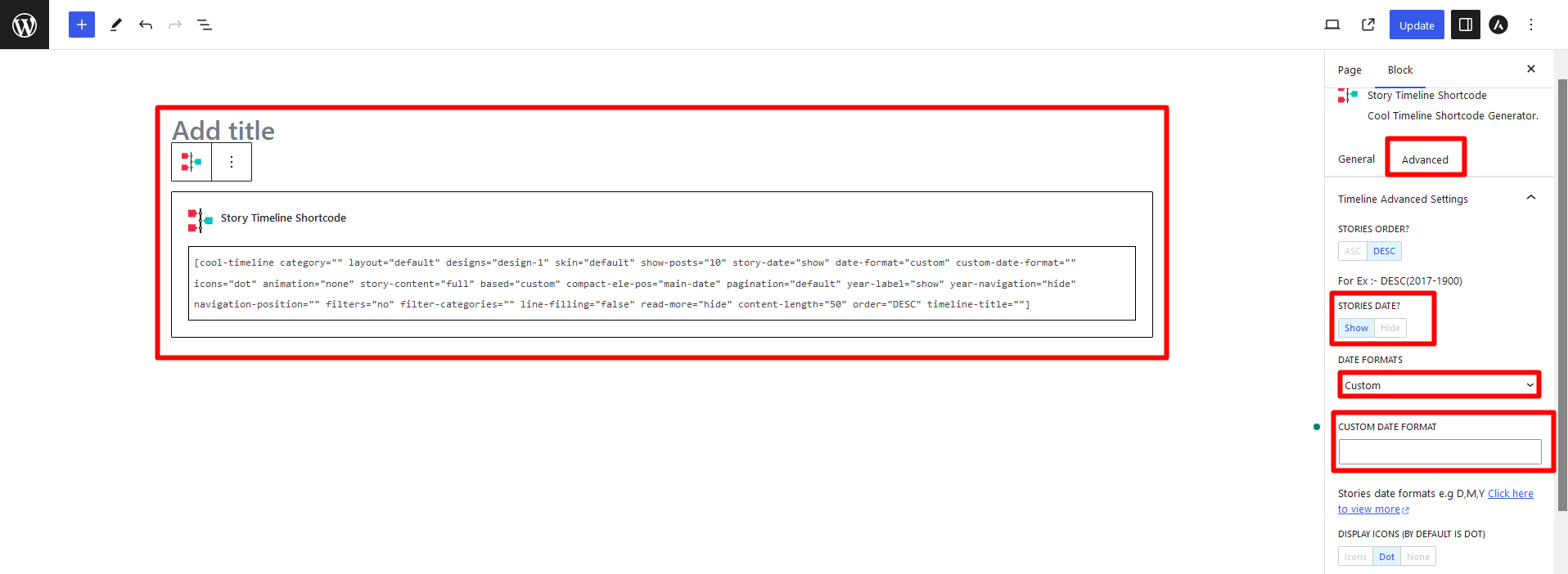
custom_date_format
Last Updated
Cool Timeline Pro

Create stunning vertical or horizontal timelines to showcase your story, history, or roadmap.

Need Help? Contact Our Support Team
In This Article
Share it
Cool Timeline Pro

Create stunning vertical or horizontal timelines to showcase your story, history, or roadmap.

Limited Time Special Offer

UP TO 80% OFF

259200

OFFER ENDS IN:

D
H
M
S
Year End Sale
save up to 80% off

Offer
ends in:

Days
Hours
Min
Sec
Christmas
Special Sale

Upto

80%

OFF

Ends in

Days
Hours
Min
Sec
upto
80% off

SUPER SALE

up to
80
%

off

Offer
ends in:

Days
Hours
Min
Sec
upto
80% off

SUPER SALE

up to
80
%

off

Offer
ends in:

Days
Hours
Min
Sec
upto
80% off
Independence
Day Sale

SUPER SALE

up to
80
%

off

Offer
ends in:

Days
Hours
Min
Sec
upto
80% off

UP TO 80% OFF

Offer ends in:

D
H
M
S

Mid-Year Special Sale

UP TO 80% OFF

Offer ends in:

D
H
M
S

WordPress Birthday Sale

UP TO 80% OFF

Offer ends in:

D
H
M
S

WordCamp Asia Celebration Sale

UP TO 80% OFF

Offer ends in:

D
H
M
S

Easter & Good Friday Special Sale

UP TO 80% OFF

OFFER ENDS IN:

D
H
M
S
Special Sale

UPTo

80% 

OFF

Upto 80% off

OFFER ENDS IN:

D
H
M
S
save up to 80% off

SUPER SALE

up to
80
%

off

Offer
ends in:

Days
Hours
Min
Sec
New Year Sale
save up to 80% off

Offer
ends in:

Days
Hours
Min
Sec
Christmas Special Sale
Upto 80% OFF
Christmas
Special Sale

Upto

80%

OFF

Ends in

Days
Hours
Min
Sec